The things teams usually ask before installing.
Can people outside our company approve?
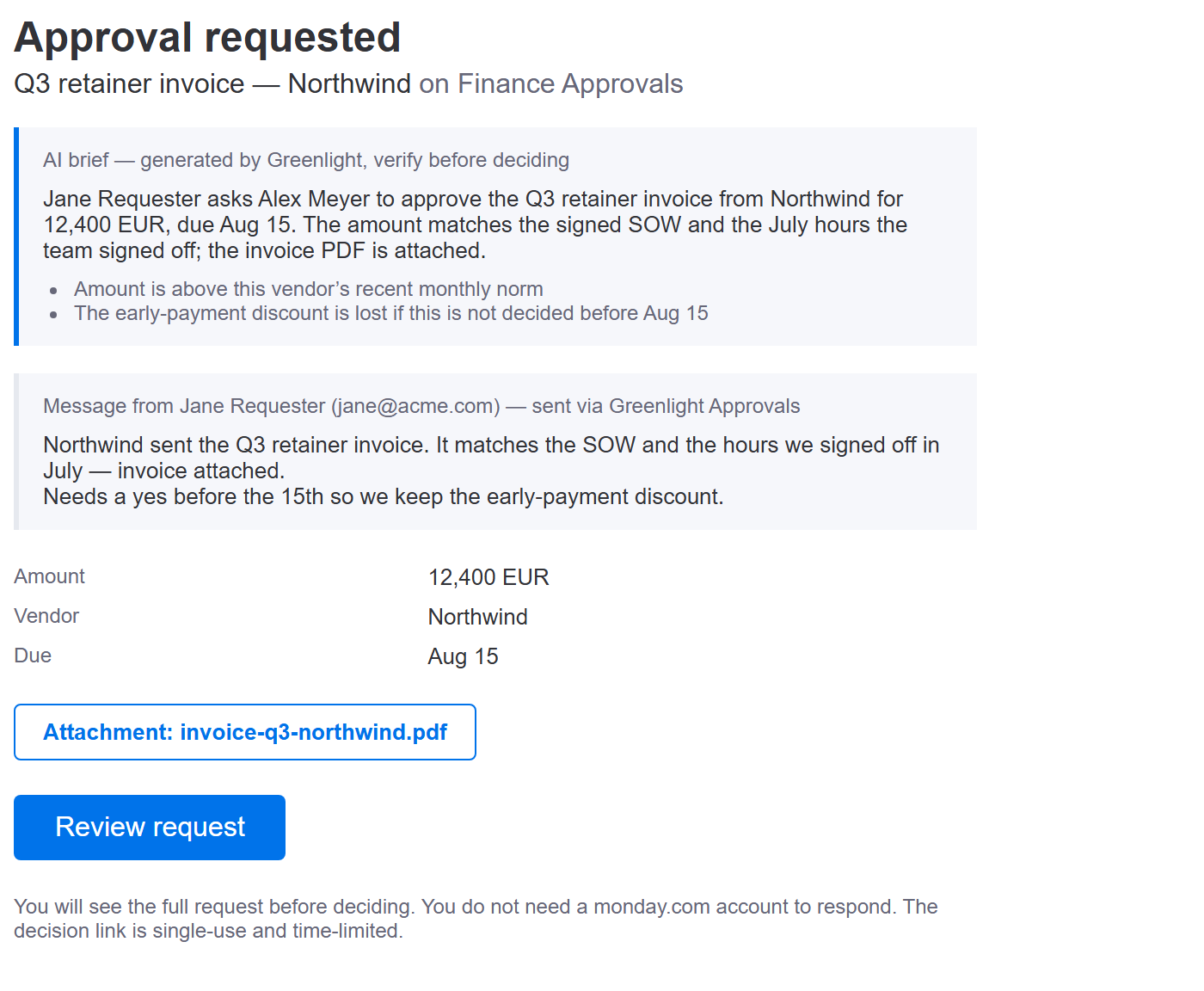
Yes. A client, supplier or accountant who doesn't work in monday can decide from the email — no monday account needed, nothing to install — and their decision is written back to your board like any other. Your own team decides inside monday: the My Approval Queue board view lists everything waiting on them, and Review on a row opens the decision page, where they approve or reject.
How is this different from the Approvals app by AppFox?
Four things: outside partners can take part in the approval (theirs only works with monday users), approvers who serve several monday accounts get all of it in one inbox instead of one queue per account, pricing where every feature is on every plan and unlimited approvals cost a flat $29/mo billed yearly ($35 monthly) (theirs charges $100/mo for unlimited), and your audit trail stays on your boards instead of a third-party database.
Do I have to build an automation before I can use it?
No — you can send a request from any item on day one, with nothing configured. But the automation isn't just a shortcut you can skip: it's the path most teams run day to day, because it fires the approval off your process instead of off someone remembering. Set it up once per board, in about two minutes. Both paths write the decision back to your Approval, Approved By and Approved At columns, and most teams end up using both.
Which should I use — the automation or the Request button?
Both, usually. Use the automation when the approval should happen every time your process hits a point — an item reaching Pending, a contract reaching Ready for review. Use the Request button when a person needs to ask for something specific and explain it, because a status change carries no message, no attachment and no author. Neither is a fallback for the other.
Why isn't the automation already on the board template?
monday.com doesn't let a board template carry a third-party app's automation — that's a platform limitation on their side, not a choice of ours. So whether you start from our board template, the “Create my approvals board” button, or a board you already have, the recipe gets added once per board by you. It takes about two minutes and the user guide walks through it.
Can approvals route themselves based on the item?
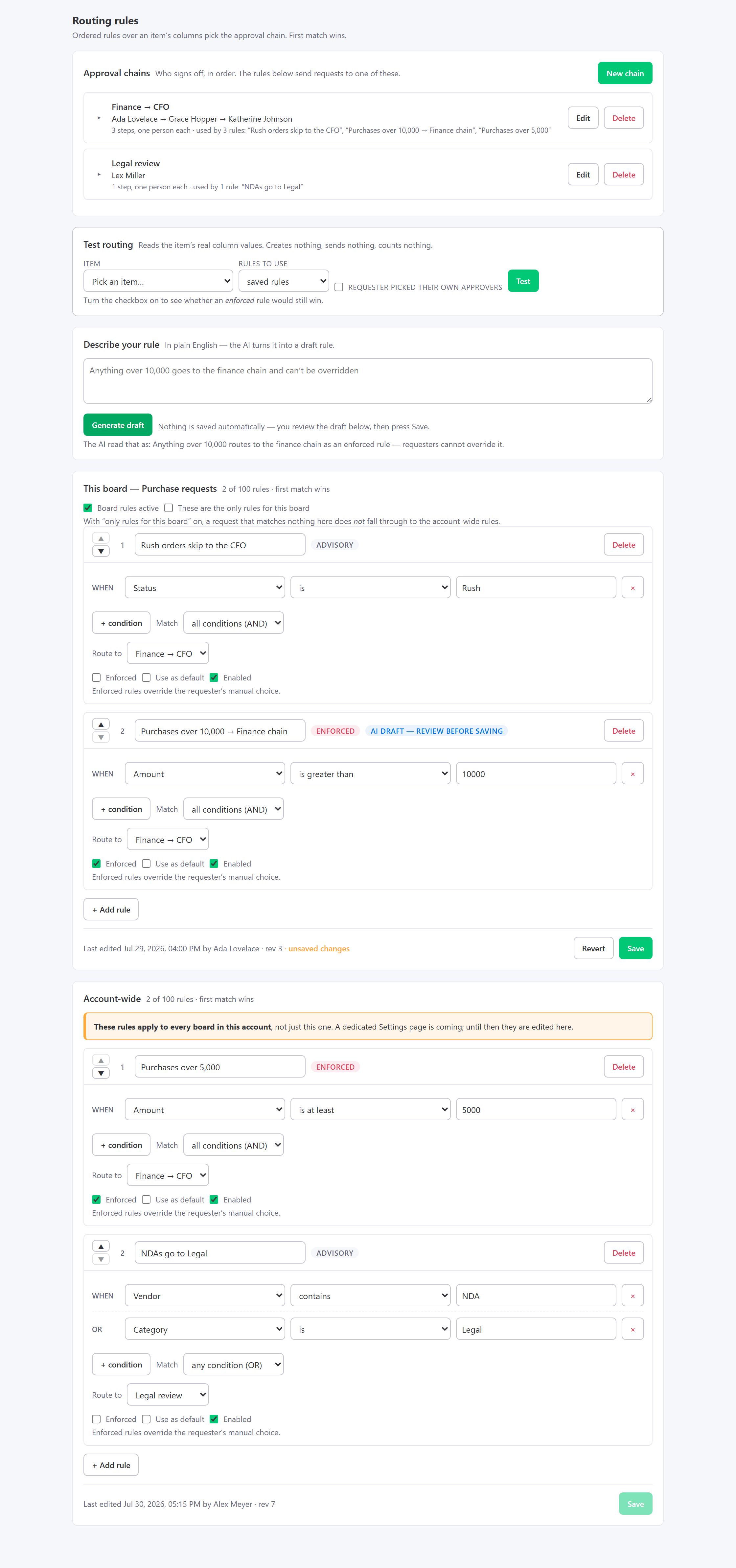
Yes — that's what routing rules do. Write ordered rules over an item's Number, Status, Dropdown and Text columns (“Amount is at least 5,000 → Finance → CFO”), and the first match picks the chain. Rules can apply to one board or the whole account, and an enforced rule overrides whatever approver the requester picked — which is the point when the rule exists for compliance reasons. A built-in Test routing tool shows you exactly which rule a real item would hit, and why, without sending anything. Not sure how to write the rule? Describe it in plain English and the AI drafts it for you to review — nothing saves until you press Save.
What does the AI do — and what does it not do?
Two things. Every approval request gets a short AI brief: two or three plain-English sentences on what's being asked, by whom and the key facts — including the text of a pdf, docx, xlsx, pptx, txt or csv attachment — plus up to three anomaly flags when something looks off, like an amount that's unusual for that item. And admins can describe a routing rule in plain English and get a pre-filled draft to review. What the AI never does: approve, reject, or save anything. A human always decides, and the brief is labelled “verify before deciding”. AI features are on every plan, including Free — the free plan caps AI calls at 30 per month, Pro at 1,000 (max 50 rule drafts).
What is the Greenlight Portal?
A web app at app.greenlight-approvals.com/portal/ that you sign into with monday. It has your Inbox, Queue, Aging, History, Rules and Settings. The Inbox is the part nobody else has: if you approve for several monday accounts — an agency's clients, say — it shows every pending approval from every one of them in a single list.
Can I send a file with the approval request?
Yes — one file up to 10 MB per request (pdf, png, jpg, jpeg, gif, webp, docx, xlsx, pptx, txt, csv). It's stored on the item's own Files column in your monday account, and each approver gets their own signed, expiring link to open it. They don't need a monday account to download it.
Where is my data stored?
On your monday boards. Requests, decisions, approvers, and timestamps are written to item updates and columns. The app also keeps an approval record for each request (item, approvers, stages, decisions, comments, timestamps) in monday's own app storage, scoped to your account, until you uninstall — plus a few small operational records, like monthly usage counters, portal sign-in sessions and a hashed approver index. No separate approvals database. The privacy policy has the details.
Can I have multi-stage approval chains?
Yes — any number of sequential stages, one approver each: Manager first, then Finance, say. When one approver signs off, the next is notified automatically. Approvers can be resolved dynamically from a People column (e.g. each department's manager) or set as fixed emails.
What happens if someone doesn't respond?
Greenlight sends automatic reminders to the approver after 24 hours of silence. The aging dashboard shows every pending approval bucketed by waiting time with a Remind now button per row, so you can chase a specific person immediately instead of waiting for the next sweep.
Can I cancel a request after sending it?
Yes, while it's still waiting. The person who sent it, or an account admin, clicks Cancel request in the item's Approval Panel and can add a reason. The approver's link then says the request was cancelled, and the item gets an audit note. A cancelled request still counts toward the month's approvals. See the user guide.
Is there a free plan?
Yes — 15 approvals per month on one board, free forever, no credit card. It's genuinely useful for small teams, and it's how we earn reviews rather than locking basics behind a paywall.
Which monday.com plans does it work with?
Any plan that supports automations and marketplace apps, including Standard and Pro. Greenlight does not require an Enterprise plan — that's rather the point.
Can approvers leave a comment with their decision?
Yes — the decision page has an optional comment box. Comments are stored in the chain history and written into the item's audit update, so reject reasons and context are never lost. Approvers who don't type anything just click Approve or Reject, as before.
What happens if someone edits an item after it's approved?
It's reverted automatically. Nothing to set up: the app snapshots the item at approval time, and later edits are undone within seconds, with an audit note on the item. To change an approved item, send a new request: you can change the amount in the Request dialog as you send it. For other values sent with the request, send it, cancel it, edit, then send again. monday.com has no true field-level lock, so the edit happens for a moment before it's undone — and we say so honestly.
Can someone approve a request by changing the status column by hand?
No. While a request is waiting, manual changes to the Approval status, Approved By and Approved At columns are reverted within seconds, and an update on the item says who the request is waiting for. Only the current approver can approve or reject it. The values sent with the request are put back too if someone changes them while it waits. This is automatic, no setup needed.
How do I get help?
Use the contact form below — it lands directly in our support inbox. You can also email contact@greenlight-approvals.com. We usually reply within one business day.